


1. Melden Sie sich in Ihrem cPanel-Konto an.
2. Klicken Sie im Bereich Datenbanken auf MySQL-Datenbanken.

3. Geben Sie im Feld Neue Datenbank einen Namen für die neue Datenbank ein, die Sie erstellen möchten.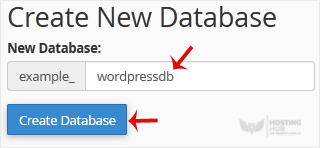
4. Klicken Sie auf Datenbank erstellen.
Most Popular Articles
How to Create a Database in cPanel
1. Log in to your cPanel account.2. In the Databases section, click on MySQL Databases. 3. In the...
How to Rename a Database in cPanel
1. Log in to your cPanel account. 2. In the Databases section, click on MySQL Databases. 3....
How to Delete a Database in cPanel
1. Log in to your cPanel account. 2. In the Databases section, click on MySQL Databases. 3....
How to Add a User to a Database and Grant Privileges
1. Log in to your cPanel account. 2. In the Databases section, click on MySQL Databases. 3....
How to Import a Database via phpMyAdmin in cPanel
1. Log in to your cPanel account.2. In the Databases section, click on phpMyAdmin.3. From the...

