


Wenn Sie ein FTP-Konto löschen möchten, können Sie dies mit Hilfe dieser Anleitung durchführen.
1. Melden Sie sich in Ihrem cPanel-Konto an.
2. Klicken Sie im Bereich Dateien auf FTP-Konten.

3. Wählen Sie in der Liste FTP-Konten die Option Löschen.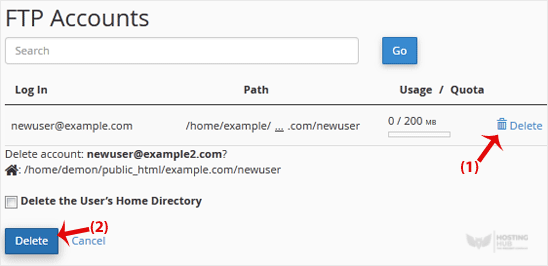
4. Klicken Sie erneut auf Löschen, um das FTP-Konto zu bestätigen und zu entfernen.
Warnung: Verwenden Sie nicht die Option Home-Verzeichnis des Benutzers löschen. Andernfalls werden auch die Daten in Ihrem FTP-Benutzerkonto gelöscht und sind nicht wiederherstellbar, es sei denn, Sie stellen sie mit einem Backup wieder her.
Most Popular Articles
How to Change the Password of the FTP Account in cPanel
To change the main root FTP account, you have to change the password of your cPanel account....
How to Change the FTP User Quota in cPanel
Follow these steps to change the FTP quota or set it to Unlimited.1. Log in to your cPanel...
How to Delete an FTP User Account From cPanel
If you want to delete an FTP account, you can accomplish it by following this tutorial.1. Log in...
How to Create an FTP Account in cPanel
You can access the FTP account using the cPanel login details, which gives you full access to the...
Cum să creezi un cont FTP în cPanel
Puteți accesa contul FTP utilizând detaliile de conectare cPanel, care vă oferă acces complet la...

