


BoxTrapper erfordert, dass alle E-Mail-Absender, die nicht auf Ihrer Whitelist stehen, auf Verifizierungs-E-Mails antworten. Es schützt Sie vor Spam.
Wenn Sie unerwünschte E-Mails loswerden möchten, aktivieren Sie Boxtrapper entweder für alle E-Mails oder nur für ausgewählte E-Mails und konfigurieren Sie es.
1. Melden Sie sich in Ihrem cPanel-Konto an,
2. Im Bereich E-Mail klicken Sie auf BoxTrapper.

3. Auf der BoxTrapper-Seite sehen Sie eine Liste Ihrer E-Mails unter der Überschrift Konto und den Status von BoxTrapper unter der Überschrift Status. Wählen Sie Verwalten.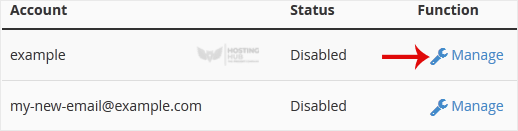
4. Auf der BoxTrapper-Verwaltungsseite, wenn der Status Deaktiviert ist, wählen Sie Aktivieren.
Most Popular Articles
How to Enable BoxTrapper in cPanel
BoxTrapper requires all email senders not on your Whitelist to respond to verification emails. It...
How to Edit an Account Level/Global Email Filter in cPanel
1. Log in to your cPanel account.2. In the Email section, click on Global Email Filters. 3. Under...
How to Create a "User Level Email Filter" in cPanel
It is hard to stop spam email entirely but you can filter it, discard it, deliver it to the...
How to Edit "User Level Email Filter" in cPanel
1. Log in to your cPanel account. 2. In the Email section, click on Email Filters. 3. Under...
How to Enable Apache SpamAssassin and SpamBox in cPanel
Apache SpamAssassin is a mail filter that identifies spam. An intelligent email filter uses...

