


Sie können eine E-Mail mit Thunderbird senden. Dies ist recht einfach, da Sie sich nicht manuell bei der cPanel-Webmail anmelden müssen. Sie können eine E-Mail direkt über den Mozilla Thunderbird E-Mail-Client senden.
1. Öffnen Sie Mozilla Thunderbird.
2. Klicken Sie auf der linken Seite des oberen Menüs auf Verfassen. 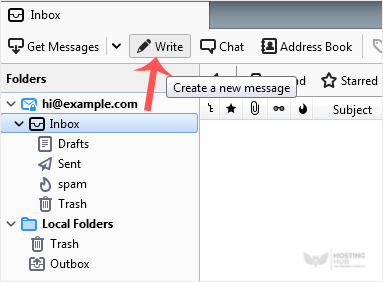
Wenn Sie mehrere E-Mail-Konten haben, klicken Sie auf Ihr Konto und ein Dropdown-Menü wird sich öffnen. Wählen Sie dann die entsprechende E-Mail aus und geben Sie das E-Mail-Konto der Person, an die Sie eine E-Mail senden möchten, in das Feld An ein.
Geben Sie im Betrefffeld den Betreff Ihrer E-Mail ein, geben Sie Ihre Nachricht in das Nachrichtenfeld ein und klicken Sie dann auf Senden.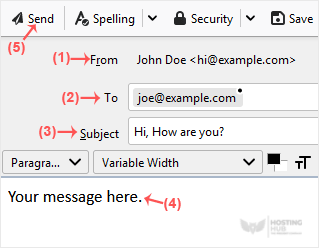
Most Popular Articles
How to Setup a cPanel Email Account in Mozilla Thunderbird
Thunderbird is a friendly email client software for managing your email. You can set up a cPanel...
How to Check for New Email in Mozilla Thunderbird
Thunderbird is an email client software. You can work with it in the following way. 1. Open...
How to Send an Email Using Mozilla Thunderbird
You can send an email using Thunderbird. It is quite straightforward as you do not need to log in...
How to Delete Email Messages in Mozilla Thunderbird
You can easily remove email in Mozilla Thunderbird. If you use the POP email protocol, the...
How to Reply to Email in Mozilla Thunderbird
You can reply to an email using Mozilla Thunderbird instead of the cPanel Webmail. 1. Open...

