


Sie können eine E-Mail mit Mozilla Thunderbird an andere E-Mail-Konten weiterleiten.
1. Öffnen Sie Mozilla Thunderbird.

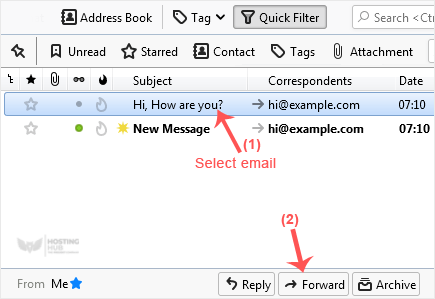
2. Gehen Sie zum Posteingang. Wählen Sie die Nachricht aus, die Sie weiterleiten möchten, und es wird die Option Weiterleiten angezeigt. Klicken Sie darauf.
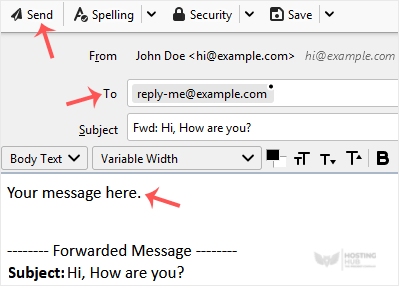
3. Geben Sie Ihre Nachricht in das Nachrichtenfeld ein. Ändern Sie weder den E-Mail-Titel noch den restlichen Text. Klicken Sie dann auf Senden.
Most Popular Articles
How to Setup a cPanel Email Account in Mozilla Thunderbird
Thunderbird is a friendly email client software for managing your email. You can set up a cPanel...
How to Check for New Email in Mozilla Thunderbird
Thunderbird is an email client software. You can work with it in the following way. 1. Open...
How to Send an Email Using Mozilla Thunderbird
You can send an email using Thunderbird. It is quite straightforward as you do not need to log in...
How to Delete Email Messages in Mozilla Thunderbird
You can easily remove email in Mozilla Thunderbird. If you use the POP email protocol, the...
How to Reply to Email in Mozilla Thunderbird
You can reply to an email using Mozilla Thunderbird instead of the cPanel Webmail. 1. Open...

