


Die automatische Installation eines Plugins ist einfach und unkompliziert. Sie können es jedoch auch manuell installieren. Dies beinhaltet das manuelle Herunterladen eines Plugins, das Hochladen und die Aktivierung.
Stellen Sie sicher, dass Sie bereits eine Zip-Datei des Plugins auf Ihren Desktop heruntergeladen haben.
1. Melden Sie sich im WordPress-Dashboard an.
2. Gehen Sie vom Dashboard-Menü zu Plugins und klicken Sie auf Neu hinzufügen.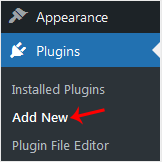
3. Klicken Sie auf Plugin hochladen und dann auf Durchsuchen. Wählen Sie die Zip-Datei Ihres Plugins aus und klicken Sie auf Jetzt installieren.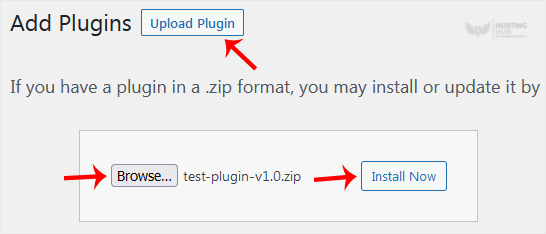
4. Klicken Sie auf Plugin aktivieren.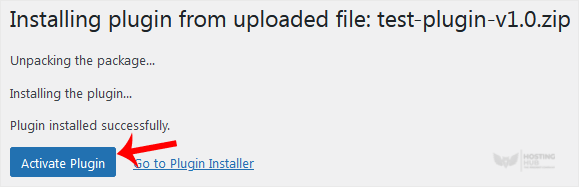
Hinweis: Nach der Aktivierung eines Plugins wird ein neues Menü dieses Plugins zum Dashboard-Menü hinzugefügt.
Most Popular Articles
How to Access the WordPress Admin Dashboard
WordPress is an easy to work with CMS software. To access a WordPress account, please follow...
How to Remove Sample Comments and Posts From WordPress
You get sample comments and posts in a fresh WordPress install. You can easily remove them in the...
How to Write and Publish Your First Blog Post in WordPress
Writing your first blog post is a fascinating thing. Follow the steps below to do so in...
How to Remove a Post in WordPress
You can remove the published or draft post in WordPress.1. Log in to the WordPress dashboard. 2....
How to Bulk Delete Posts in WordPress
It is possible to delete posts in bulk using WordPress. You can also delete selected posts in...

