


Sie können das Passwort einfach ändern, wenn Sie Zugang zu Ihrem WordPress-Konto haben.
1. Melden Sie sich im WordPress-Dashboard an.
2. Gehen Sie im Dashboard-Menü zu Benutzer und klicken Sie auf Profil.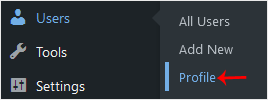
3. Scrollen Sie nach unten zu Kontoverwaltung und klicken Sie auf Neues Passwort festlegen.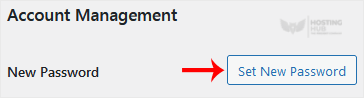
4. Kopieren Sie das Passwort an einen sicheren Ort und klicken Sie auf Profil aktualisieren, um Ihr Passwort zu ändern.
Most Popular Articles
How to Access the WordPress Admin Dashboard
WordPress is an easy to work with CMS software. To access a WordPress account, please follow...
How to Remove Sample Comments and Posts From WordPress
You get sample comments and posts in a fresh WordPress install. You can easily remove them in the...
How to Write and Publish Your First Blog Post in WordPress
Writing your first blog post is a fascinating thing. Follow the steps below to do so in...
How to Remove a Post in WordPress
You can remove the published or draft post in WordPress.1. Log in to the WordPress dashboard. 2....
How to Bulk Delete Posts in WordPress
It is possible to delete posts in bulk using WordPress. You can also delete selected posts in...

