


1. Öffnen Sie Outlook 2019.

2. Im linken Bereich können Sie eine Liste Ihrer E-Mail-Konten sehen, doppelklicken Sie darauf, um sie zu erweitern.
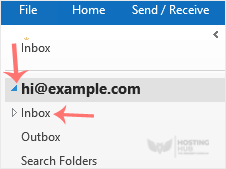
3. Klicken Sie auf Posteingang, und die Synchronisierung wird gestartet.

1. Öffnen Sie Outlook 2019.
2. Im linken Bereich können Sie eine Liste Ihrer E-Mail-Konten sehen, doppelklicken Sie darauf, um sie zu erweitern.
3. Klicken Sie auf Posteingang, und die Synchronisierung wird gestartet.
You can set up a cPanel email account with Microsoft Outlook 2019 and manage your email...
You can easily remove email in Outlook 2019. If you use the POP email protocol, the email...
You can forward the email using Outlook 2019. 1. Open Outlook 2019. 2. Go to Inbox,...
You can reply to emails using Outlook 2019 instead of cPanel Webmail. 1. Open Outlook...
You can send emails using Outlook 2019. It is pretty straightforward because you do not need to...

