


Wir hoffen, dass Sie bereits unser Tutorial zum Einrichten eines cPanel E-Mail-Kontos in Android gelesen haben und bereits ein integriertes E-Mail-Widget zu Ihrem Android-Bildschirm hinzugefügt haben. cPanel ermöglicht es Ihnen, E-Mails mit verschiedenen IMAP/POP/SMTP-Technologien zu versenden.
1. Öffnen Sie Ihren E-Mail-Posteingang oder die Gmail-Anwendung.

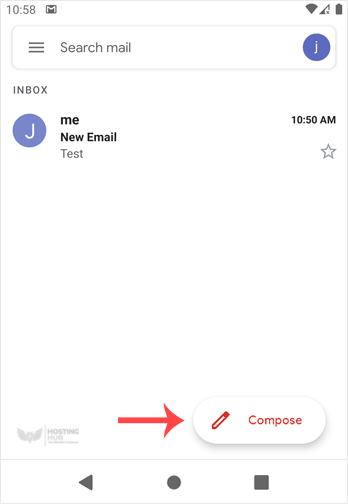
2. Tippen Sie in der Mail-App auf Verfassen.
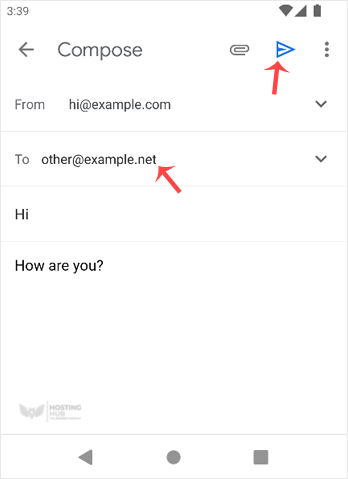
3. Geben Sie die E-Mail-Adresse der Person, an die Sie die E-Mail senden möchten, in das An-Feld ein. Geben Sie den E-Mail-Betreff ein und schreiben Sie Ihre Nachricht. Tippen Sie dann auf Senden.
Most Popular Articles
How to Read cPanel Emails in Android
Suppose you have already added your cPanel email accounts to your Android built-in email...
How to Delete cPanel Emails in Android
We hope you have already read our tutorial on How to Set Up a cPanel Email Account in Android,...
How to Fetch – Sync Emails in Android
We hope you have already read our tutorial on How to Set Up a cPanel Email Account in Android,...
How to Send an Email via Android
We hope you have already read our tutorial on How to Set Up a cPanel Email Account in Android,...
How to Set Up an Email Signature in Android
We hope you have already read our tutorial on How to Set Up a cPanel Email Account in Android,...

