


Sie können den Hostnamen in SolusVM ändern.
1. Melden Sie sich in Ihrem SolusVM Control Panel an.
2. Falls Sie mehrere VPSs haben, wählen Sie den entsprechenden aus.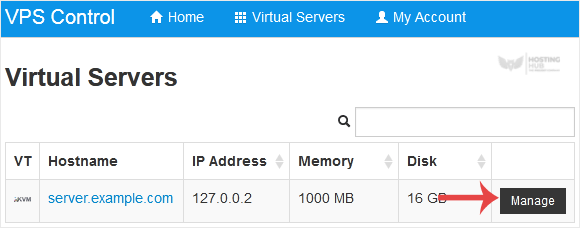
3. Scrollen Sie nach unten. Unter dem Hostname-Tab geben Sie Ihren Hostnamen in das Textfeld ein. Klicken Sie dann auf Ändern.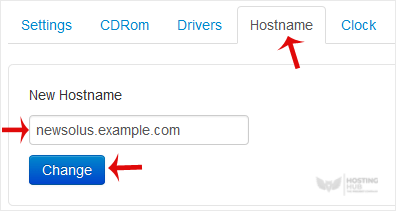
4. Ein Neustart ist erforderlich, damit die gespeicherten Änderungen wirksam werden.
Einige Beispiel-Hostnamen:
server1.example.com
hostingserver.example.com
Most Popular Articles
How to Reboot/Restart VPS in SolusVM
You can restart VPS via the command line or SolusVM.How to Reboot/Restart a VPS via SolusVM?1....
How to Reinstall OS Using SolusVM OS-Reinstaller
You can easily Install/Reinstall the operating system using SolusVM. However, note that this...
How to Turn APIC, ACPI, VNC, or PAE On or Off in SolusVM
SolusVM allows you to enable or disable VNC, PAE, APIC, and ACPI.1. Log in to your SolusVM...
How to Change the Disk Driver to Virtio or IDE in SolusVM
We recommend changing the disk driver to Virtio or IDE before installing the operating system....
How to Change the Network Card to Virtio, Intel PRO, or Realtek in SolusVM
You can change your network card from the SolusVM control panel. 1. Log in to your SolusVM...

