
How to Remove a Database User in Plesk

Knowledgebase / How to Remove a Database User in Plesk

How to Remove a Database User in Plesk

0 found helpful (0 votes) ...
Back to Knowledgebase


1. Log in to your Plesk account.


2. Click on Databases from the Sidebar Menu.

plesk-database-menu.gif


3. Click on User Management from the right sidebar.
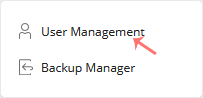
plesk-database-user-management-menu.gif


4. Under Database Users, checkmark the appropriate database user you want to remove and click on Remove.
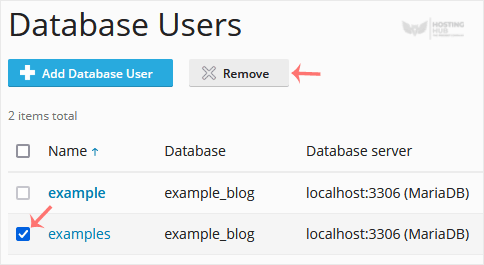
plesk-remove-database-user.gif


5. A confirmation box will appear. Confirm with Yes to remove the user.


Was this article helpful?


Still need help?

Open a support ticket →

On This Page
