




































1. Log in to your cPanel account.
2. In the Databases section, click on phpMyAdmin.
3. Click on the Expand icon from the navigation tree in the left sidebar.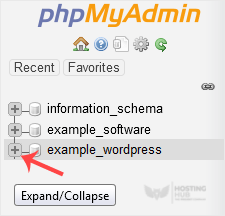
4. Select the appropriate table you want to delete. If you're going to delete table "wp_links", choose it.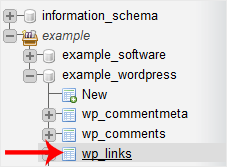
5. Now click on Operations.
6. Scroll down and then click on Delete the table (DROP).
Warning: The whole table will be removed. Please, note that it will be impossible to restore it, especially if you don't have a backup.

