




































The automatic installation of a plugin is easy and straightforward. However, you can also install it manually. It will involve manually downloading a plugin, uploading, and activating it.
Make sure you have already downloaded a zip file of the plugin to your desktop.
1. Log in to the WordPress dashboard.
2. From the Dashboard menu, go to Plugins and click on Add New.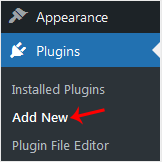
3. Click on Upload Plugin and then on Browse. Choose your plugin's zip file and click Install Now.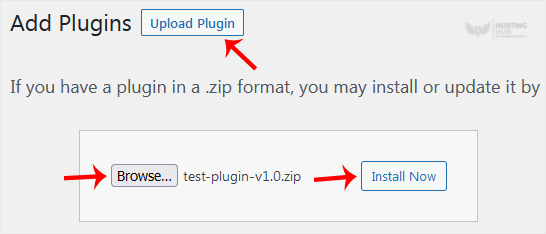
4. Click on Activate Plugin.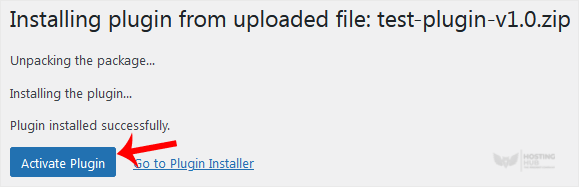
Note: After activating a plugin, a new menu of that plugin is added to the Dashboard menu.
How to Manually Install a WordPress Plugin
Back to Knowledgebase
Was this article helpful?
Related Articles
How to Access the WordPress Admin Dashboard How to Remove Sample Comments and Posts From WordPress How to Write and Publish Your First Blog Post in WordPress How to Remove a Post in WordPress How to Bulk Delete Posts in WordPressStill need help?
Open a support ticket →
