




































1. Log in to your cPanel account.
2. In the Databases section, click on MySQL Databases.

3. In the New Database field, enter a name for the new database you wish to create.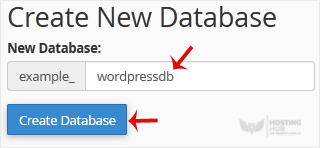
4. Click on Create Database.
How to Create a Database in cPanel
Back to Knowledgebase
Was this article helpful?
Related Articles
How to Rename a Database in cPanel How to Delete a Database in cPanel How to Add a User to a Database and Grant Privileges How to Import a Database via phpMyAdmin in cPanel How to Export Database Table via phpMyAdmin in cPanelStill need help?
Open a support ticket →
