


1. Log in to your cPanel account.
2. In the Email section, click on Global Email Filters.

3. Under Current Filters are displayed all existing filters. Click Edit next to the appropriate one.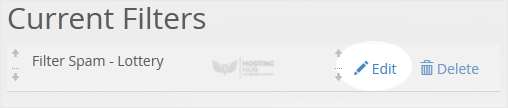
4. Make the desired changes to the filter.
5. Click on Save.
How to Edit an Account Level/Global Email Filter in cPanel
Back to Knowledgebase
Was this article helpful?
Related Articles
How to Enable BoxTrapper in cPanel How to Create a "User Level Email Filter" in cPanel How to Edit "User Level Email Filter" in cPanel How to Enable Apache SpamAssassin and SpamBox in cPanel How to Delete "User Level Email Filter" in cPanelStill need help?
Open a support ticket →
