


Wenn Sie eine E-Mail über iOS senden, wird Ihrer Antwort automatisch eine Signatur hinzugefügt, wie z. B. Gesendet von meinem iPhone. Aber wussten Sie, dass Sie diese Signatur auch anpassen können?
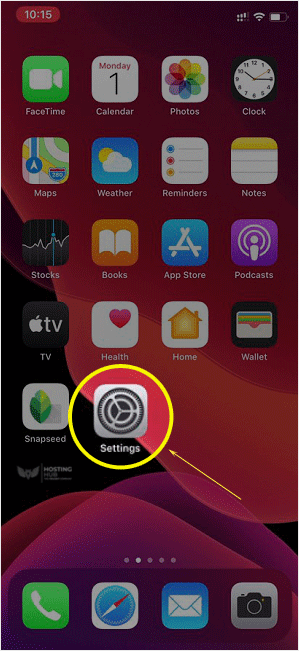
1. Öffnen Sie den Hauptbildschirm Ihres Apple Mobile und klicken Sie auf das Einstellungen-Symbol.
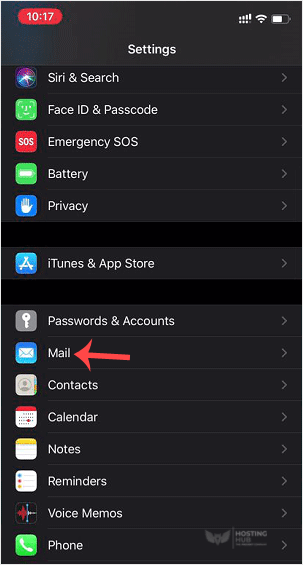
2. Scrollen Sie nach unten und tippen Sie auf Mail.
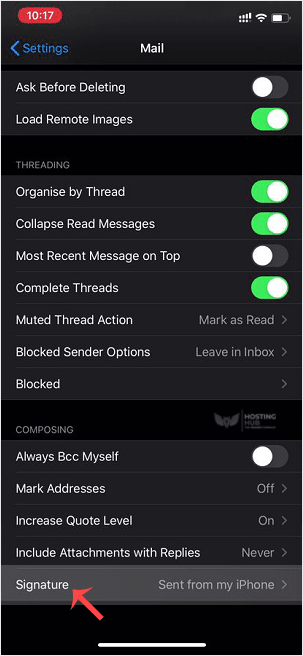
3. Tippen Sie nun auf Signatur.
4. Passen Sie Ihre Signatur an.
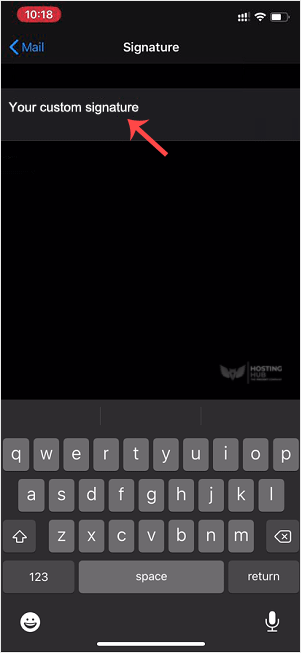
Nach der Änderung sendet Ihr iOS Ihre angepasste Signatur anstelle der Standardsignatur.
Wie man die Signatur eines Apple/iOS-Geräts ändert (Gesendet von meinem iPhone)
Back to Knowledgebase
Was this article helpful?
Related Articles
How to Add a cPanel Email Account on Apple/iOS How to Check/Fetch an Email on Apple/iOS How to Automatically Sync or Fetch a cPanel email on Apple/iOS How to Change the Signature of an Apple/iOS (Sent From My iPhone) Cum să adăugați un cont de email cPanel pe Apple/iOSStill need help?
Open a support ticket →
