



































You can easily change the password if you have access to your WordPress account.
1. Log in to the WordPress dashboard.
2. From the Dashboard menu, go to Users and click on Profile.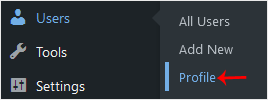
3. Scroll down to Account Management and click on Set New Password.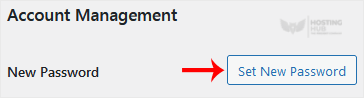
4. Copy the password to a safe place and click on Update Profile to change your password.
How to Change the Password of a WordPress Account
Back to Knowledgebase
Was this article helpful?
Related Articles
How to Access the WordPress Admin Dashboard How to Remove Sample Comments and Posts From WordPress How to Write and Publish Your First Blog Post in WordPress How to Remove a Post in WordPress How to Bulk Delete Posts in WordPressStill need help?
Open a support ticket →
