



































Poți schimba cu ușurință parola dacă ai acces la contul tău WordPress.
1. Conectează-te la panoul de control WordPress.
2. Din meniul Dashboard, accesează Users și fă clic pe Profile.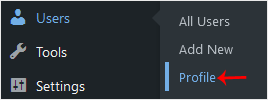
3. Derulează în jos până la Account Management și fă clic pe Set New Password.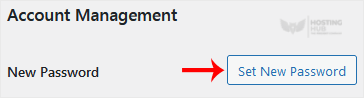
4. Copiază parola într-un loc sigur și fă clic pe Update Profile pentru a-ți schimba parola.
Cum să schimbați parola unui cont WordPress
Înapoi la baza de cunoștințe
A fost util acest articol?
Articole similare
Cum să accesezi panoul de administrare WordPress Cum să eliminați comentariile și postările eșantion din WordPress Cum să scrii și să publici primul tău articol de blog în WordPress Cum să ștergi o postare în WordPress Cum să ștergi în masă postări în WordPressAveți în continuare nevoie de ajutor?
Deschideți un tichet de suport →
